A domain’s current WHOIS record only shows when its latest registration started. If a name was registered years ago, expired, sat open for five years, and was registered again last summer, WHOIS makes it look brand new.
Both Research and WHOIS lookup now include a Domain history card built from daily registry zone files going back to May 2016. At a glance, you can see when a domain was first registered, how long it has been held, whether it ever dropped, and when it appeared for sale on the aftermarket.
Ten years of zone-file history in one timeline
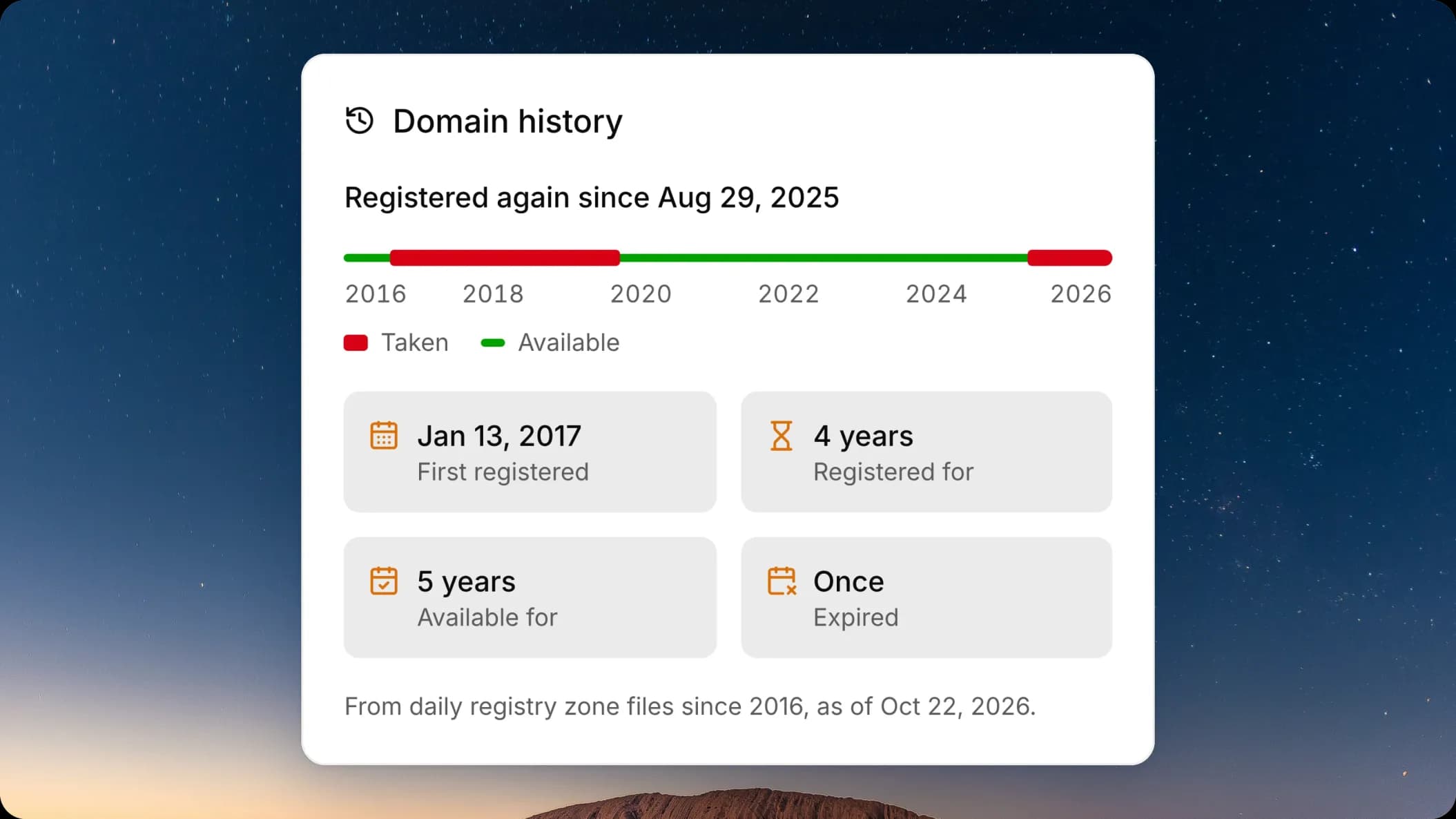
Take noshgarden.com. Its current WHOIS record shows a creation date of August 29, 2025. On the Research page, the new Domain history card fills in the rest of the story:
- Status timeline from 2016 to 2026. Thick red bars mark Taken periods when the domain was active in the zone file, while thin green lines mark Available periods when it was unregistered.
- Four summary facts. Below the timeline, the card reports First registered (Jan 13, 2017), total time Registered for (4 years), total time Available for (5 years), and how many times the domain Expired (Once).
- Redemption-hold filtering. When a domain enters a brief registrar hold or redemption period of less than 35 days before being renewed, the timeline merges those adjacent spans automatically so a routine renewal delay is never miscounted as an expiration.
Historical aftermarket listings
Knowing that a domain has been continuously registered is useful. Knowing whether its owner has been trying to sell it is even better. When a domain appeared in aftermarket feeds while registered, the timeline overlays blue For sale bars directly on top of the red Taken bar and notes the most recent listing month in the legend, such as For sale, last in Oct 2026 on noshfarm.com.
Built into both Research and WHOIS lookup
You do not need to visit a separate tool to check a domain’s past. On Research, the Domain history card sits with the registration details, after the WHOIS record or the purchase options. On WHOIS lookup, it spans the full width of the page directly below the live WHOIS record, so you can compare the current registration dates against ten years of zone-file observations in one view.
Try it
Look up any domain on Research or WHOIS lookup to inspect its registration timeline. It is free and requires no account.
Frequently asked questions
Where does the domain history timeline come from?
We build the timeline from daily registry zone files collected since May 2016. Whenever a domain enters or leaves a zone file, we record the transition date. The For sale bars come from recent aftermarket listing snapshots, so an older listing can be missing.
What if a domain was registered before May 2016?
Our zone-file archive begins on May 31, 2016. A name that was already in the zone file on that first snapshot is shown as registered since 2016 or earlier. The card does not plot a creation date from before the archive.
Why are short gaps under 35 days merged into the surrounding registration?
A domain that briefly leaves the zone file during a registrar hold or redemption grace period and returns in less than 35 days was renewed by its owner rather than dropped to the public. Merging gaps of less than 35 days keeps the Expired count focused on real drops. A return after exactly 35 days counts as a new registration.