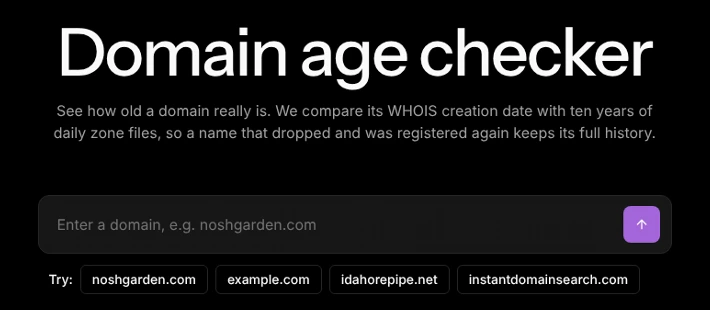
To check how old a domain is, look up its WHOIS creation date, then compare it with the first day the name appears in the registry’s zone files. The free Domain age checker shows both in one search. You need the second date because WHOIS starts over whenever a domain drops and is registered again.
That reset is common. In October 2026, 953,573 of the 5.12 million .com names that appeared in the .com zone file had been in it before and then gone for more than 90 days. That is about 1 in 5, and a name gone that long usually shows up in WHOIS as a new domain.
How do I check a domain’s age?
It takes three steps and about ten seconds.
- Open the Domain age checker, type the domain, and press Enter. You can also tap one of the example names under the box.
- Read the two ages. First seen registered is the first day the zone files show the name, and WHOIS creation date is when the current registration began.
- Read the timeline under them. It shows when the name was taken, when it was available, and the dates it expired and was registered again.
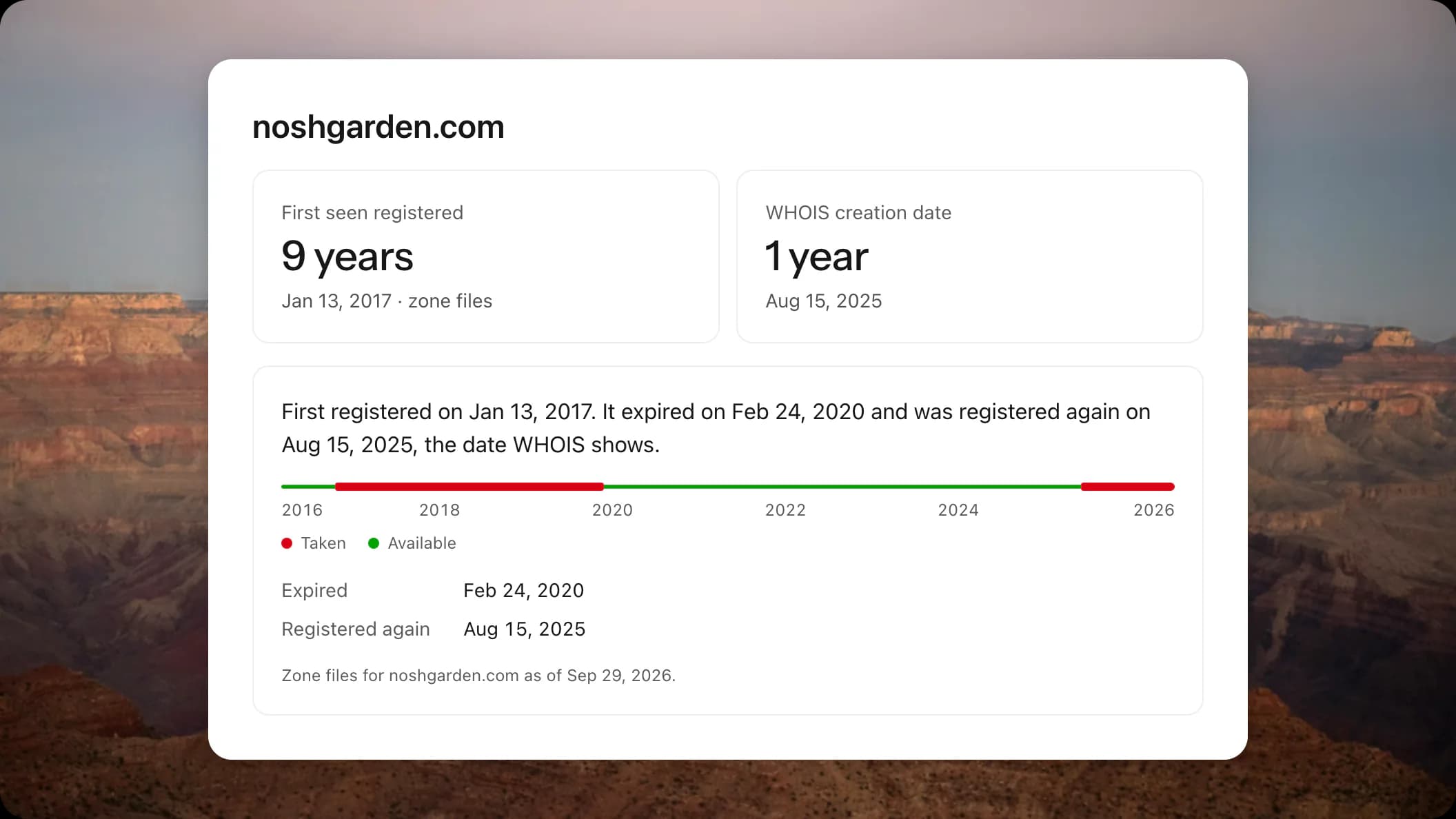
Take noshgarden.com, one of the examples. WHOIS says it was created on Aug 15, 2025, which makes it look about a year old. The zone files first show it registered on Jan 13, 2017. It expired on Feb 24, 2020, sat unregistered for more than five years, and was then registered again. The name is 9 years old, with a gap that WHOIS does not show.
Why does the WHOIS creation date get domain age wrong?
The WHOIS creation date, which RDAP also reports, is the day the current registration began. When a domain is sold or moved to another registrar, that date stays the same. When a domain expires and is deleted, the registry forgets it, and whoever registers it next gets a brand new creation date.
So WHOIS answers a narrower question than most people are asking. It tells you how long the current registration has run, not how long the name has existed. Some guides say the registration date never changes, even when the domain is sold. That is true for a sale, but not for a drop.
The zone files fill the gap. A zone file is the list of every domain in an extension that has name servers, and registries for .com, .net, .org and most newer extensions publish theirs every day. We have kept a daily copy since May 31, 2016, so the checker can see each day a name entered or left.
How often does a domain’s WHOIS age reset?
More often than you might expect. We looked at every .com name that appeared in the .com zone file in October 2026 and checked when, if ever, it had last left the zone file before that.
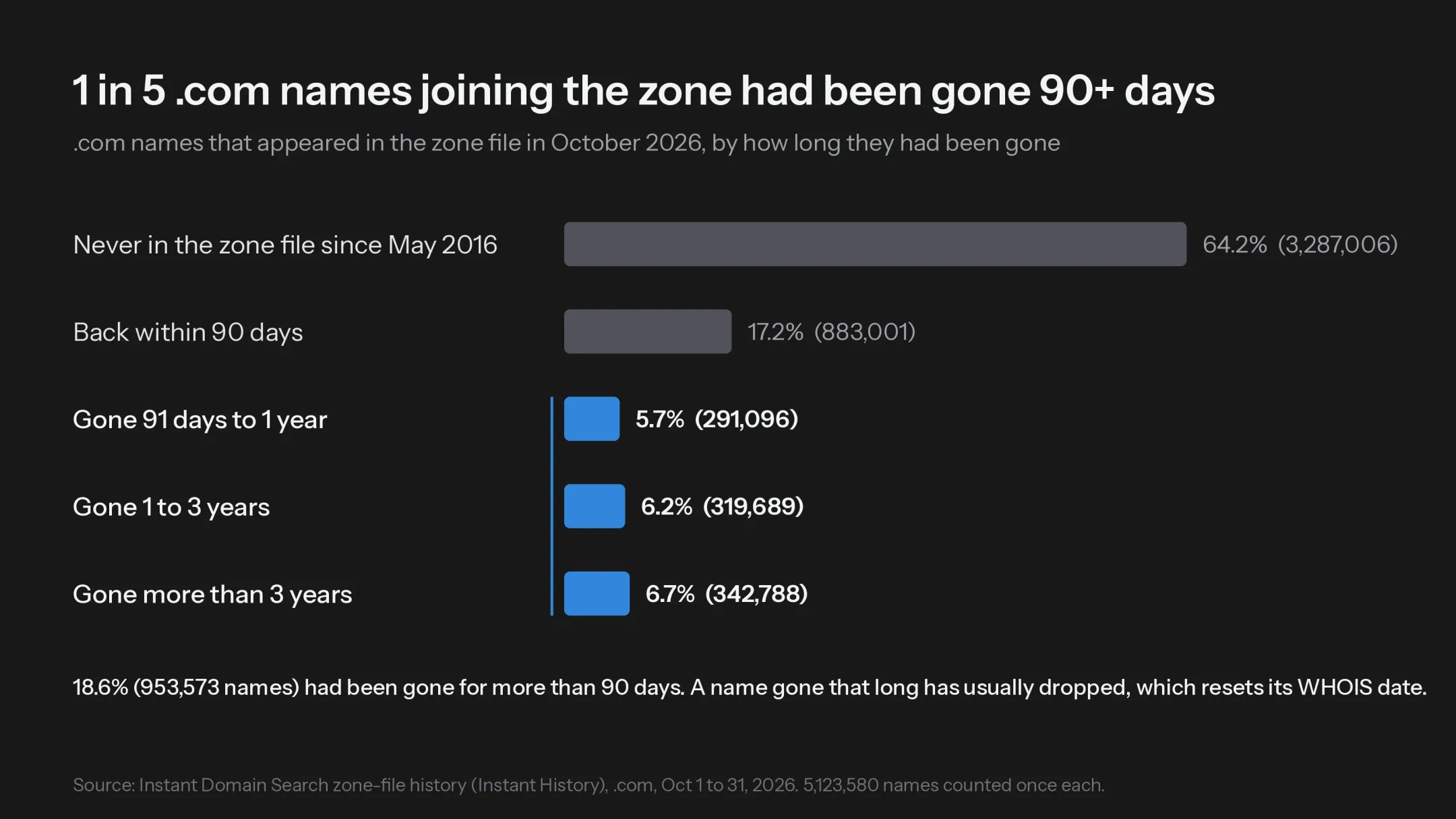
Of 5,123,580 names, 18.6% had been gone for more than 90 days. That is 953,573 names, and 342,788 of them had been gone for more than three years. Another 17.2% came back within 90 days, which usually means a hold or a lapse that the owner fixed before the name was deleted.
A name that has been out of the zone file for more than 90 days has usually expired, been deleted and been registered again. That resets its WHOIS creation date. A name can also stay out of the zone file while it has no name servers, so a few of these could be names that were never deleted.
What are the ways to check a domain’s age?
There are four common ways, and they answer slightly different questions.
| Method | What it tells you | Where it falls short | Cost |
|---|---|---|---|
| Domain age checker | WHOIS creation date, first day in the zone files since May 2016, and every drop | Extensions without public zone files, such as .io and .ai, show the WHOIS age only | Free, no account |
| WHOIS lookup or ICANN’s lookup.icann.org | The creation date of the current registration, plus registrar and expiry | Starts over after a drop and shows no earlier history | Free |
| Wayback Machine | The first saved snapshot of a website on the domain | Measures the website, not the registration, and misses sites it never saved | Free |
| Historical WHOIS services | Older WHOIS records, sometimes with past owners | Coverage varies, and most are paid | Usually paid |
Most free domain age checkers read the WHOIS creation date and stop there. That is fine for a name that has never dropped. For anything you are about to buy, link to or trust, check the zone-file history too.
What does the result mean?
Once you have both dates, the combination tells you what happened to the name.
| What you see | What it means | What to do next |
|---|---|---|
| Both dates match | The name has been registered without a break since then | Use the WHOIS date as its age |
| First seen is older than WHOIS | The name dropped and was registered again | Treat it as a new owner on an old name, and check what it was used for before |
| WHOIS is older than first seen | The registration began before the name’s first day in the zone files, which can happen when it had no name servers yet | Use the WHOIS date as its age |
| “2016 or earlier” | It was already registered when our history starts | If WHOIS shows an earlier year, use that date. A later date means the name dropped and was registered again |
| WHOIS age only, with no timeline | The zone-file history is unavailable: the extension has no public zone file, or the history lookup failed | For .com, .net or .org, search again in a few minutes; for .io or .ai, check the Wayback Machine for earlier websites |
| An On hold line under the timeline | A hold took the name out of the zone files without deleting it | The WHOIS date still stands |
What should I do with a domain’s age?
It depends on why you are asking.
- Buying a domain: an older name can carry links and type-in visitors, but a dropped name may have lost them. Look at its history in Research, and run a domain appraisal, which counts age among its signals.
- Vetting an email or a website: a domain registered in the last few weeks deserves a closer look before you click or pay. Check who is behind it with our guide to finding out who owns a domain.
- Thinking about SEO: Google has said that age on its own is not a ranking factor. What helps is the history a name built while it was in use.
- Waiting for a name to free up: the expiry date in the WHOIS record tells you when the current registration ends, and expired domains lists names as they drop.
How we counted
The figures come from Instant History, our record of every day’s changes in the .com zone file since May 31, 2016. These counts run through October 31, 2026.
| Names that appeared in October 2026 | Count | Share |
|---|---|---|
| Never in the zone file since May 31, 2016 | 3,287,006 | 64.2% |
| Back within 90 days | 883,001 | 17.2% |
| Gone 91 days to 1 year | 291,096 | 5.7% |
| Gone 1 to 3 years | 319,689 | 6.2% |
| Gone more than 3 years | 342,788 | 6.7% |
| Total | 5,123,580 | 100% |
Each name counts once, on its first appearance in the month. The gap is the number of days since the name last left the zone file.
Frequently asked questions
How old is a domain if WHOIS says it was created this year?
It may be much older. A new WHOIS creation date only means the current registration started this year. If the zone files show the name earlier, it dropped and was registered again.
Can I check the age of a .io or .ai domain?
Partly. Their registries do not publish zone files, so the Domain age checker shows the WHOIS creation date only. The Wayback Machine can show whether a website used the name earlier.
Does a domain keep its age when it is sold?
Yes. A sale or a transfer to another registrar keeps the creation date. Only an expiry and deletion resets it.
Is the domain age checker free?
Yes. It is free to use, with no account and no email.